Frequently Asked Questions
Getting Started
New here? Start with the basics.
What is PuzzleParty?
PuzzleParty turns your daily puzzles into something social. Track your scores, share them with friends, and compete on friendly leaderboards called parties. Same puzzles you already love — now with bragging rights.
Do I need a PuzzleParty account?
Yes — a free account keeps your scores, streaks, and parties in sync across all your devices. Sign up takes a few seconds.
Do I play the puzzles inside PuzzleParty?
No. Keep playing your puzzles wherever you normally do. PuzzleParty is where you bring your results to track and share them.
The home screen at a glance.
Your home screen shows Today's Lineup — today's puzzles and your progress on them — and your parties. Along the bottom you'll find four tabs: Home for your parties and today's progress, People for friends and direct messages, Games to browse every puzzle we support, and Store for PuzzleParty Plus and the Tip Jar. Tap your avatar (top right corner) any time for your profile, settings, this Help guide, and Support. Tap any puzzle in the lineup for its details; once you've finished one, that's also where you'll find your grid and Everyone Today.
Most puzzles reset at your midnight; the few that roll over earlier, like the NYT Mini, get a small chip showing the time so you're never caught out.
How do I add my first score?
Finish a puzzle, tap its share button, and choose PuzzleParty — or paste the result in. See Sharing Scores for the details.
Sharing Scores
Getting your results into PuzzleParty.
How do I submit my puzzle scores?
Four easy ways: share it straight from the puzzle using your phone's share sheet, copy the result and paste it into PuzzleParty, enter it manually from Today's Lineup on your Home screen, or — if you solved on a computer — paste it into Quick Paste in your browser. We figure out the game and score for you.
Not every puzzle supports every method — open a puzzle in the Games tab to see the best way to enter results on your device.
Copying and pasting it in.
Copy your result to the clipboard on your phone and open PuzzleParty — we'll usually spot it right away and offer to add it for you. Works great for puzzles that don't have a share button. (Solving on a computer? See I play on my computer below.)
Letting PuzzleParty find the result for you.
On the latest version of the app: copy any result, open PuzzleParty, and tap + — we spot the result on your clipboard and submit it for you. No pasting, no typing.
Of all the ways to get a result in, this one works with the most puzzles. It is about as quick as sharing from the share sheet where a puzzle offers one — the real difference is where you end up. Sharing keeps you in the puzzle app; this brings you into PuzzleParty, which is handy when you want to see how everyone else did.
When iOS asks for permission, tap Allow Paste — it's safe, and iOS may ask again for each newly copied result (that's iOS, not us). Denying is harmless too: it just means pasting the result in yourself. Android doesn't ask; it shows a small system notice instead.
Once you've allowed a few pastes, iOS usually adds a Paste from Other Apps row to PuzzleParty's entry in the Settings app — set it to Allow and the asking stops. It isn't there when you first install, and iOS decides when it appears, so we can't promise exactly when you'll see it. If it isn't there yet, keep allowing the odd paste and check back.
PuzzleParty never watches your clipboard in the background. It reads it in just two moments: when you tap + to submit, and once on first launch to check for a party invite code. We keep only two things from your clipboard: results you submit (including unrecognized ones, so we can recover them for you once they're supported), and — from the one-time invite check at first launch — anything that looks like a party invite code.
Entering a score by hand (manual entry).
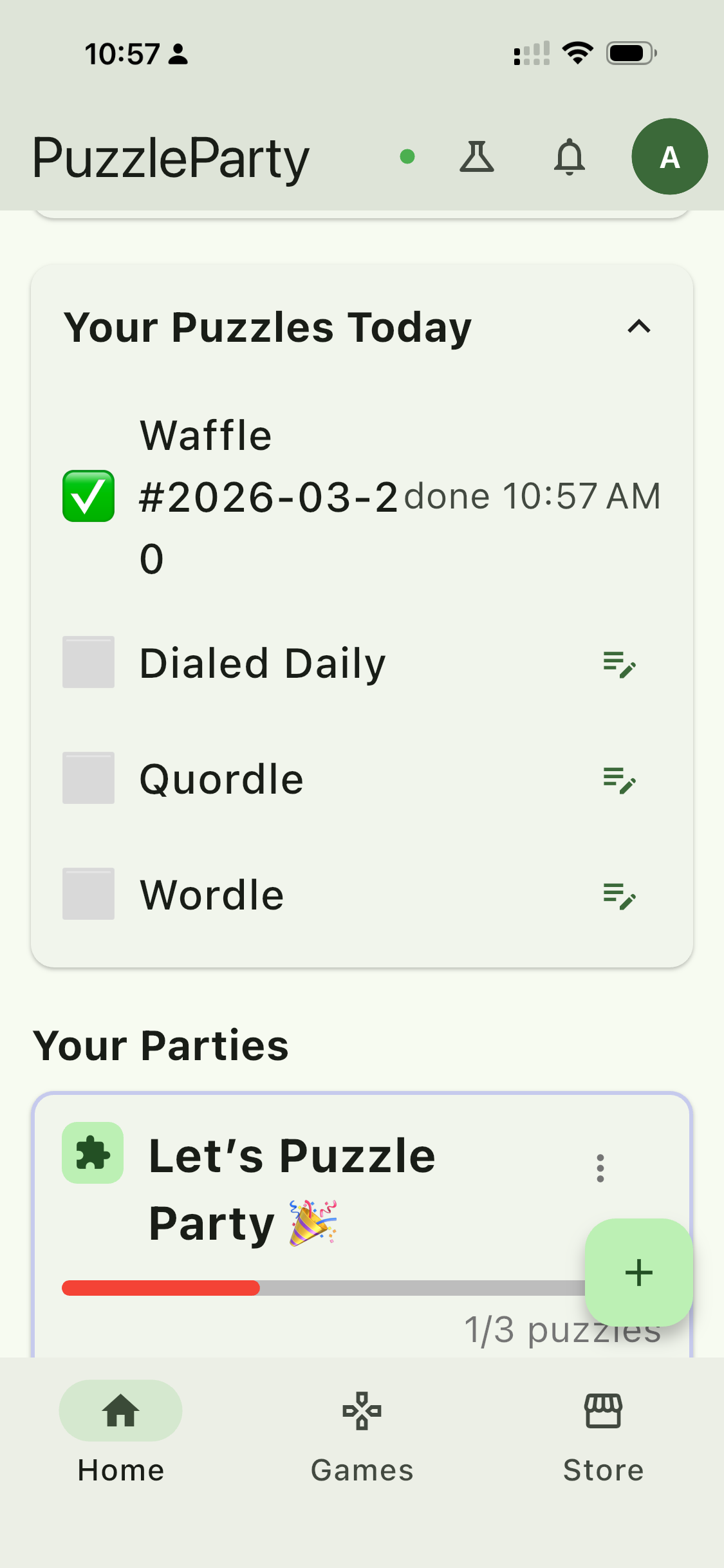
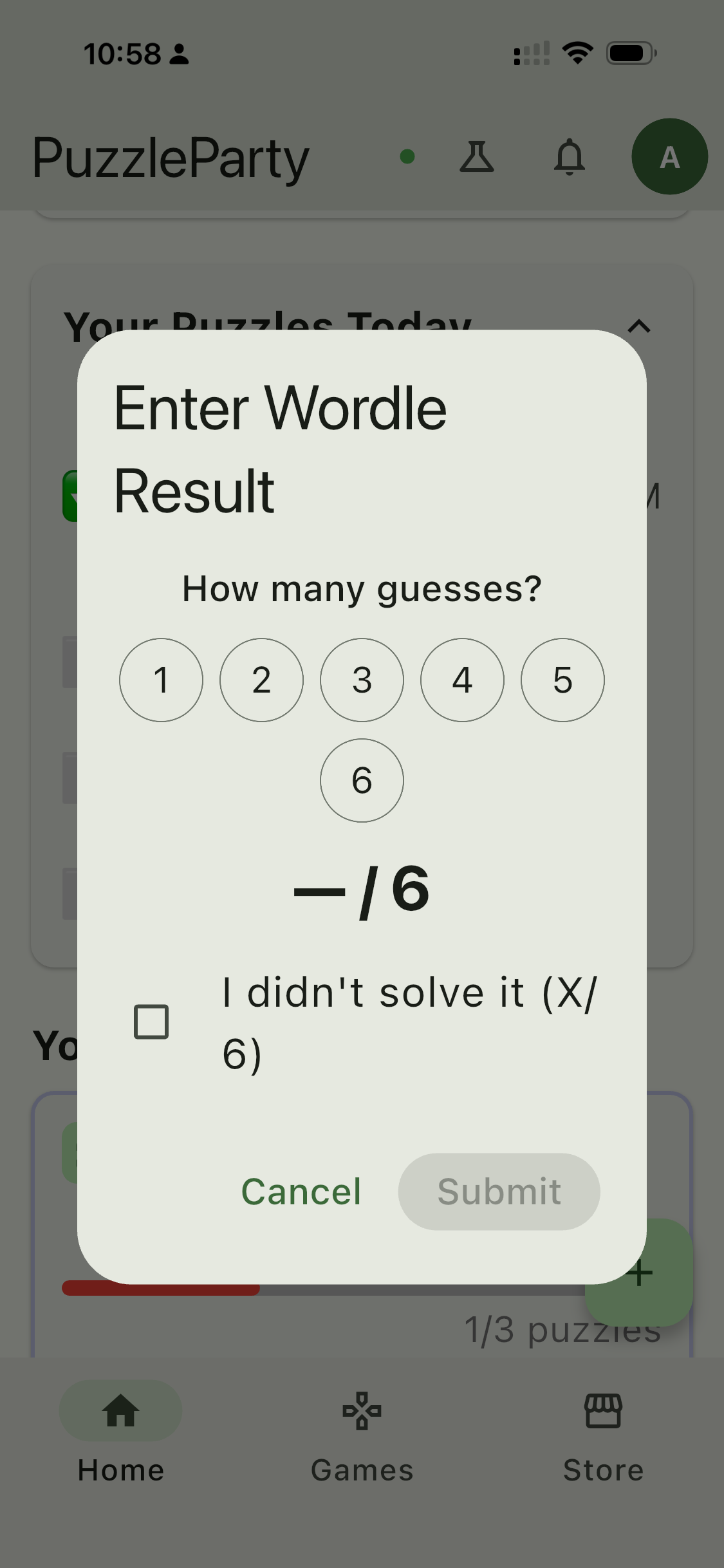
No result text to share or paste? Many puzzles let you enter your score directly: expand Today's Lineup at the top of your Home screen and tap the pencil icon on a puzzle you haven't completed, then type in your time or score. Manual entry is for today's puzzles only — for an earlier day, share or paste the result instead. Check a puzzle in the Games tab to see if it supports manual entry.
I play on my computer. How do I get my results into the app?
Use Quick Paste. Link your computer once, then paste results straight from your browser — no more mailing a Wordle grid to yourself.
- On your phone, open Settings → Linked computers and tap Link a computer.
- On your computer, go to puzzleparty.app/paste. It shows a six-character code.
- Type that code into the app and confirm. That's it.
Bookmark the page and you're set. Paste a result and it lands in the same places sharing from your phone would. You can add a note with it too, and it stays hidden behind Spoiler Prevention just like a comment in the party.
You can see and remove every linked computer from Settings → Linked computers. A computer stays linked as long as you keep using it — pasting keeps it active, and one that goes a full year without a paste unlinks itself.
I can't find PuzzleParty in my share sheet.
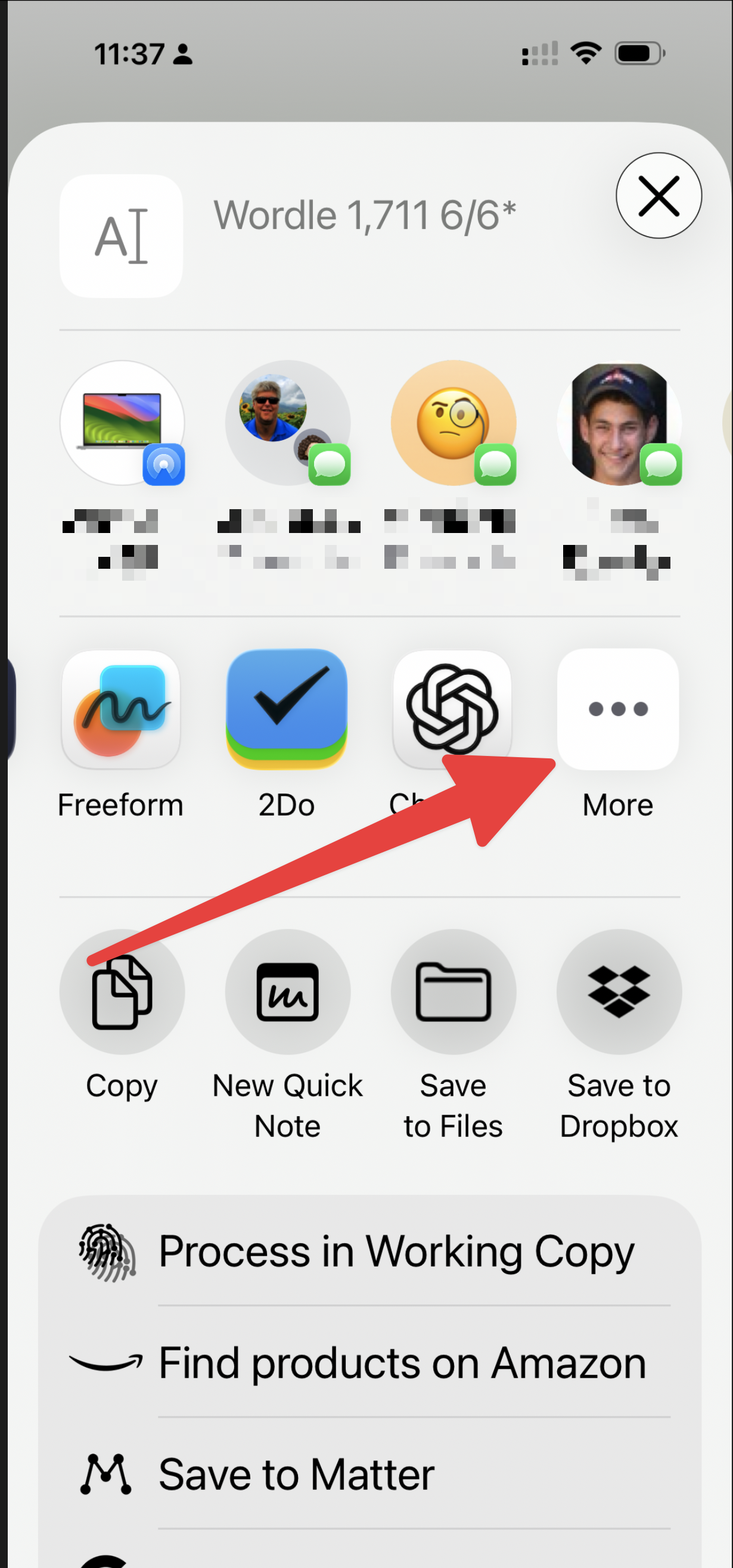
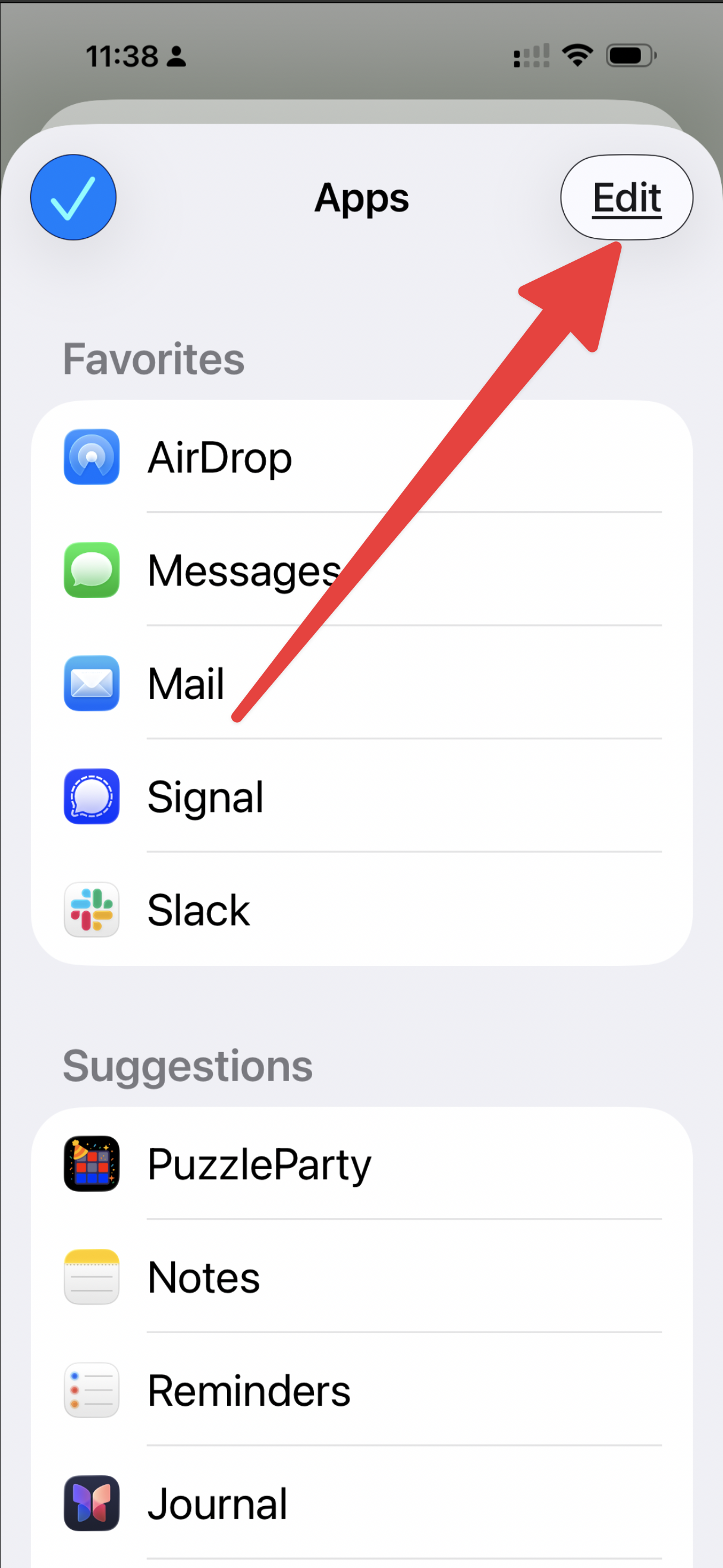
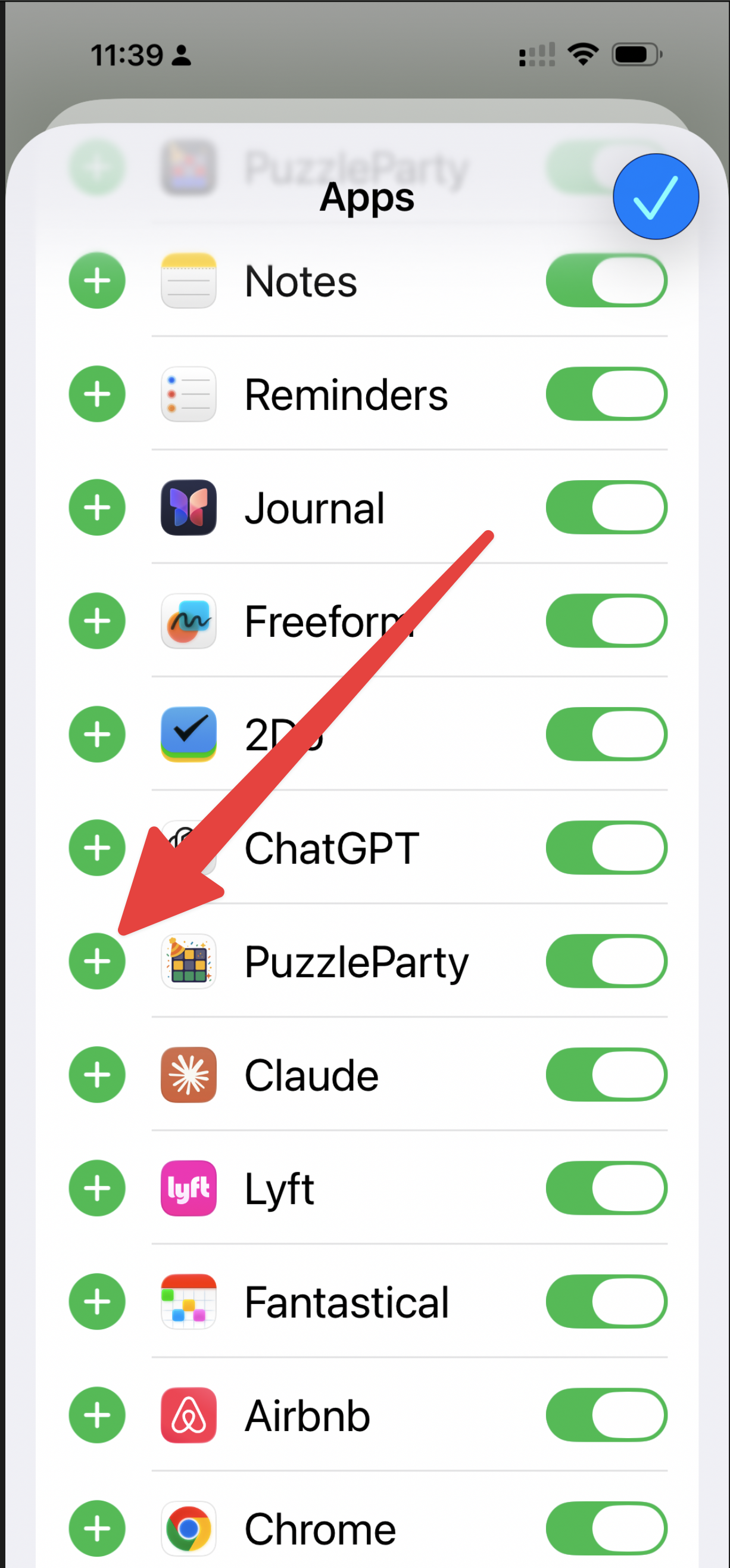
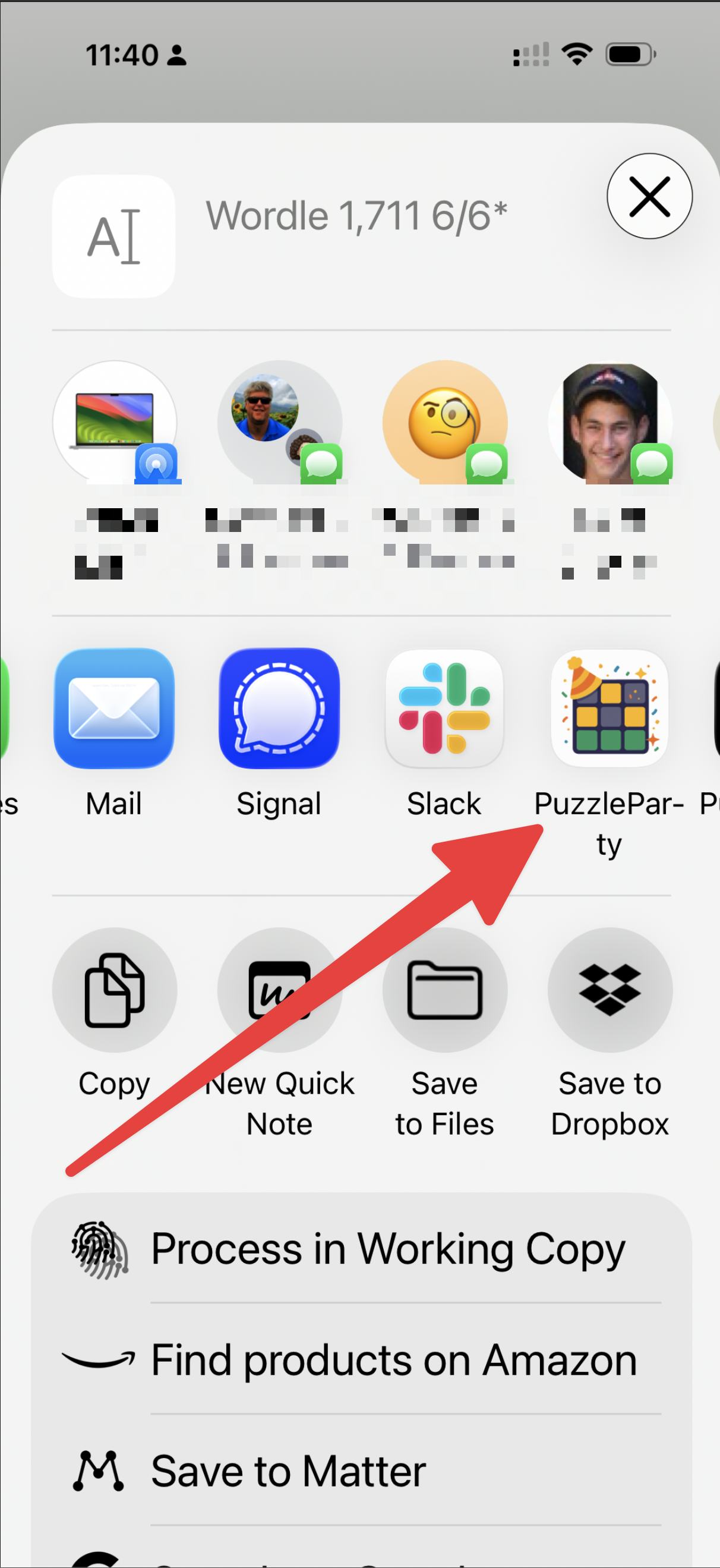
This is normal for new installs on iOS. PuzzleParty may start in the full share menu (extensions list) until you pin it to your favorites.
- Open your puzzle app and tap Share.
- Scroll to the right in the share sheet app row and tap ... (More).
- Tap Edit in the top-right corner.
- Find PuzzleParty and tap the green + button.
- Tap Done.
PuzzleParty now appears near the left in your share sheet favorites.
Prefer pictures? Open Settings → Set Up Share Extension in the app for an illustrated step-by-step walkthrough.
Which puzzles are supported?
Over 30 daily puzzles and counting — including favorites from The New York Times, LinkedIn, and more — with new games added regularly. Browse the Games tab to see the full list. Missing your favorite? Suggesting a new puzzle takes just a few seconds from the Games tab, and player suggestions drive what we add next.
Can I add a score for a past day?
Yes — you can add results for past days (up to a year back). Share or paste the result as you normally would, and the scoreboards for those previous days update automatically. Manual entry only covers today's puzzles, so for a past day you'll need the result itself. Joining a new party? Some parties also pull in your recent past scores when you join (see Parties → Backfilling).
Why can I only add one score per puzzle per day?
Each daily puzzle counts once per person, so leaderboards stay fair. Your first valid result for the day is the one that sticks.
Parties
Playing with friends.
What's a party?
A party is a group of friends comparing scores. Everyone shares their daily results and you all see a shared scoreboard — plus a group chat for everyone in the party. And with built-in spoiler prevention, you can enter your puzzles without worrying about friends getting an advantage from seeing how you did (see Spoiler Prevention). Make one for your family, your coworkers, your group chat — whatever.
How do I create a party?
Tap the button at the bottom of the party list on your Home screen. Games come first: What do you play? asks which puzzles the party tracks, and you'll need to pick at least one — you can change the list later. Then name your party and look over Party settings: Spoiler Prevention starts on, late results are counted no matter how long ago the puzzle was, and importing your puzzle history starts off. You can turn Spoiler Prevention on or off any time from the party's Party Settings; how late results are handled and whether to import history are decided when the party is created. Last comes Invite your people, where the party is created and all the ways to invite your friends open right away. You're the host.
How do I invite friends to my party?
Share your party's invite code or link by text, email, or QR code — anyone who taps the link (or enters the code) can join, no account juggling required. You'll see the sharing options right after creating a party, and you can get back to them any time from Party Details — the gear at the top of the party chat.
How do I join a party?
Tap an invite link or enter the invite code a friend gave you. You'll be added to their scoreboard right away.
Someone invited me to a party — where does the invitation show up?
An invite sent to an email address on your account can also appear in the app, where you can join the party, decline, or block the sender; a decline is visible to the sender and the party's host, and a block hides that sender's invites from you without deleting them or telling the sender.
Hosts and members.
The host runs the party and controls its major settings — which games it tracks and how it's run. Members play and chat, and everyone can personalize the party's icon and colors for their own view from Party Settings.
How many games can a party have?
As many as it wants. Track a single game, the whole catalog, or anything in between.
Can the game lineup be changed?
Yes — by the host. Hosts can add or remove games any time from Party Details — tap Edit next to the party's games.
What happens to the scoreboards when the game lineup changes?
We do our best to preserve the accuracy of past scoreboards. Just note that there could be some timing quirks on the day games are changed, added, or removed.
Backfilling: do my past scores show up?
Any score you submit for today counts toward the party right away. Some parties also pull in your recent past scores when you join, so you're not starting from a blank slate — this depends on the party's settings, so it won't always happen. Party hosts can also choose to accept score entries for past days — see Sharing Scores for how that works.
Can I be in a party without competing?
Yes! Turn off Score me on the leaderboard in the party's Party Settings to play for fun. You stay fully in the party — feed, chat, reactions, streaks — but results you post from that point on won't appear on scoreboards or standings. (A result you posted earlier the same day, while still competing, stays on that day's scoreboard.)
A few things to know:
- It's per-party. You can compete in one party and play for fun in another.
- Other members can see you're playing for fun — a small "playing for fun" note appears next to your name — so nobody wonders where you went on the leaderboard.
- You can flip the switch back any time to start competing again.
Curious how this affects everyone's points? See Scoring & Rankings.
Leaving or archiving a party, and removing members.
Members can leave any time from Party Details — the gear at the top of the party chat. Hosts can archive a party (wrap it up) from the same screen, and can remove a member from its member list if someone isn't playing nice.
Scoring & Rankings
How you stack up.
How is my total score for the day calculated?
You get one point for every party member you beat on each game, plus one. Your day's total is the sum of those points across every game your party plays.
For example, in a 3-player party:
- Finish 1st on Wordle → 3 points (you beat 2 party members, plus one).
- Finish 2nd on Connections → 2 points (you beat 1, plus one).
- Miss the Mini → 0 points.
- Day total: 5 points.
If you don't solve a puzzle (or don't submit one), you get zero points for that game.
Why did my friend and I tie on the overall scoreboard when we didn't tie on any single game?
Because the daily total is the sum of per-game points, two players can reach the same total through different paths.
Example: in a 3-player party you finish 1st on Wordle (3 points) and 3rd on Connections (1 point) for a 4-point total. Your friend finishes 2nd on both (2 + 2) and also ends the day with 4 points. Same total, no shared placements.
Overall ties are a normal outcome under this system.
What happens to my score on a game I didn't play?
Missing a game — whether you didn't submit or didn't solve it — earns 0 points for that game.
The game still counts toward the ceiling of what you could have scored. In a 3-player party, skipping a game you could have won costs you up to 3 points that day.
Submitting consistently matters as much as placing well: a full card of 2nd-place finishes beats a mix of 1st-place wins and skipped games.
Do I get points just for finishing?
Yes — solving beats skipping every time. Even a last-place finish earns at least one point (you always get the "plus one"), and submitting consistently often beats a few big wins with gaps. Showing up counts.
Why points instead of one universal score?
Points reward how you did against your own party that day, so wildly different puzzles compare fairly and the leaderboard is about your group — not a global average.
How does "playing for fun" affect scoring?
Members who are playing for fun (see Parties) are left out of the math entirely: they don't take up a spot in the rankings, and points are calculated as if the party were just its competing members. A friend playing for fun can post a great result without bumping anyone down the leaderboard.
The switch takes effect from the moment it's flipped, and it's not retroactive. Results posted while playing for fun never earn points — even if that member starts competing again later — and results posted while competing keep their points on every scoreboard they landed on, including today's. Streaks and personal stats keep building the whole time either way.
Stats & Streaks
Your personal progress.
Where are my stats?
Your personal stats live on your profile page — tap your avatar on the Home screen. Every player gets the basics. PuzzleParty Plus unlocks the full treatment: statistics and achievements for every game you play, in incredible detail, from that same profile page.
Plus users can also go head-to-head: open the People page and tap the Head-to-head icon (a little podium) to the right of anyone's name to see how your numbers stack up against theirs.
I'm in several parties with the same people. Can I see how everyone did on one puzzle?
Yes, with PuzzleParty Plus. Once you've finished a puzzle, tap it in Today's Lineup and choose Everyone Today. You'll get one ranked list of everyone across all your parties who played that puzzle today — no matter which party you share with them — plus a spread of how the results fell (yours highlighted) and anyone's grid with a tap on their row.
It's the quickest answer to "where do I stand among all my friends on today's puzzle?" For one person across every game you share, use the head-to-head comparison on the People tab instead.
What do the trend graphs show?
Trend graphs track how your results for a game move over time, so you can watch yourself improve (or spot a slump). They're part of PuzzleParty Plus, and you'll find them with each game's detailed statistics on your profile page.
What's a streak?
PuzzleParty keeps many kinds of streaks:
- Streaks for each individual game you play.
- Streaks for the days you play all of your games.
- Streaks for the days you successfully complete all of your puzzles.
- Streaks for your parties — days in a row everyone plays every game.
Wherever you see the fire icon around the app, that's a streak — tap it to see exactly what it's counting. Every player earns and keeps all of these streaks. With PuzzleParty Plus, your profile page also adds up your overall streaks alongside your detailed stats.
How do I keep my streak alive?
With so many kinds of streaks, the rules differ — but tap any streak and it'll tell you exactly what it's counting and what keeps it going. The surest way to keep them all alive: play all the puzzles from all your parties, every day. Your day is your local day, so travelling across time zones won't cost you a streak.
What are those celebration popups?
Keeping a streak going isn't easy — and this is a party, after all. So when you hit a big moment, we celebrate it. Enjoy — you earned it.
Spoiler Prevention
See results only when you're ready.
What does Spoiler Prevention do?
Spoiler Prevention keeps puzzle-related content out of sight until you're ready to see it. When it's enabled for a party, three things are protected:
- Spoiler comments in the feed — messages tagged to a specific puzzle stay hidden until you've completed that puzzle yourself
- Puzzle entries in the feed — other members' results (scores, emoji grids, streaks) are hidden until you've done the same puzzle
- Daily scoreboards — the full scoreboard stays locked until you've completed all the puzzles represented on that day's board
New parties have Spoiler Prevention on by default. Party hosts can turn it off at any time in Party Settings.
Any member can choose "Show spoilers anyway" for themselves without affecting anyone else in the party.
Why Spoiler Prevention?
For some puzzles, seeing someone else's result before you've played — even just an emoji grid — can tip you (or them) off. To keep things fair, other people's results stay hidden until you've done the puzzle yourself.
It also frees up the conversation. Ever wanted to say something about a puzzle but held back because it might be a hint? With Spoiler Prevention, comment away — your party mates won't see it until they've finished that puzzle too. Express yourself without fear of ruining anyone else's experience.
Party Chat
Talking trash, kindly.
What's on the party screen?
Each party has a shared feed where results and chat live together. Up top you'll find three icons: the scoreboard for the day's rankings, standings for how everyone's done over time, and a gear that opens Party Details — the invite code, the member list, and the options to leave or archive the party. The gear on Party Details opens Party Settings, where you set your own icon and color for the party and whether you're scored on the leaderboard, and the host manages the party's games and Spoiler Prevention. Under the party name, tap the members chip to see who's in the party, the puzzle count chip to see which games your party plays, and the streak chip to check your party's streak.
How do I chat in a party?
Type in the message bar at the bottom and send. Your message lands in the party feed alongside everyone's results.
What are the typing dots?
When someone's writing a message, you'll see a little typing indicator — same as your favorite messaging apps.
Can I react to someone's result?
Yes — press and hold any result or message in the feed to add an emoji reaction. (Long-press the reactions under an item to see who left them.) Everyone gets the standard reactions, and PuzzleParty Plus unlocks a whole extra set.
Any etiquette tips?
Keep spoilers tagged, cheer each other on, and remember there's a real person on the other end of that scoreboard.
People & Messages
Friends and direct messages.
Who shows up on the People tab?
Everyone you share an active party with, sorted by your most recent interaction — a message, or a recently played game together. Use the search bar to find someone by name.
How do I send a direct message?
Tap anyone on the People tab to open a private one-on-one conversation. Direct messages are just between the two of you — they're completely separate from party chat. When you have unread messages, you'll see a badge on the People tab.
Can I compare my scores with a friend's?
If you have PuzzleParty Plus, yes — tap the Head-to-head icon (a little podium) to the right of anyone's name on the People tab for a head-to-head comparison: who's winning across your shared games, game by game.
Want the whole crowd on a single puzzle instead? Once you've finished it, tap it in Today's Lineup and choose Everyone Today to see everyone across all your parties who played it, ranked.
Can I quiet a chatty conversation?
Yes — open the menu in a conversation and choose mute to silence its push notifications. You'll see a small muted bell next to that person on the People tab, and unread badges still work so you won't lose track of messages. You can also tune message notifications overall in your notification settings.
Can I block or report someone?
Yes. Open the menu in a conversation to mute, block, or report that person. Blocking stops their messages immediately. Everyone you've blocked is listed under Blocked Users in the app's Settings, where you can unblock them too. And if someone's behavior crosses a line, use report — we'll take a look.
Are my messages private?
Yes. Direct messages are visible only to the two of you, and party chat only to your party. Everything is encrypted in transit. We don't routinely read messages — the only exception is if a message is reported or we need to investigate abuse. The Privacy Policy on our website has the full details.
Profile & Avatars
Making it yours.
How do I edit my profile?
Tap your avatar → My Profile to update your name and how you appear to friends.
How do I choose an avatar?
Pick from our avatar options or upload your own. Your avatar shows up across your parties.
What are avatar frames?
Frames are decorative rings around your avatar that let you show a little personality. Equip one from your profile. Some frames are exclusive — like the Pioneer frames only early PuzzleParty supporters can wear.
Notifications
Staying in the loop.
What notifications will I get?
Friendly nudges: a daily reminder to play, alerts when something happens in your parties (a friend joins, scores come in), and direct messages from friends.
Can I turn them off?
Of course — we know notifications can get intrusive fast. PuzzleParty gives you fine-grained control: choose exactly which kinds of notifications you get and which you don't, mute individual conversations, or flip a single switch to turn them all off. You'll find it all in the app's Settings, and your phone's system settings work too.
Does PuzzleParty know my time zone?
Yes. Your time zone comes from your phone, so everything runs on your clock: the daily reminder at 7 AM, the afternoon check-in, and a heads-up an hour before an early-rolling puzzle closes — sent only if you haven't played it yet. Travel and it follows you. Each one has its own switch in Settings → Notifications.
I'm not getting notifications.
Check that notifications are enabled for PuzzleParty in your phone's system settings, then reopen the app. Still stuck? Support can help.
Account & Devices
Your account, everywhere.
Can I use PuzzleParty on more than one device?
Yes. Sign in on any device and your parties, scores, and streaks come with you.
Solving on a computer? You don't need to sign in there at all — link it once with Quick Paste instead, and it can add results without touching anything else on your account. See Sharing Scores.
How is my data handled?
We keep your data secure and use it to run your scores and parties. See our Privacy Policy for the full picture.
How do I sign out?
Tap your avatar → Logout. You can sign back in any time without losing anything.
How do I delete my account?
In the app: Settings → Account → Delete Account. Don't have the app installed? Request deletion on our website at puzzleparty.app/delete-account — we'll email you a confirmation link.
Deleting your account permanently removes your profile, puzzle history, party memberships, messages, and direct messages. Parties you host get a new host or close. We keep support tickets you've submitted (with your name and email removed — the ticket text itself is kept) and unlinkable usage analytics. If your email address was previously suppressed — a bounce, a spam report, or a manual block — we also keep that record (the address, the reason, and timestamps, with no link to your account) so we can avoid sending it unwanted email. Everything else is deleted within minutes; backups are purged within 90 days.
Heads up: deleting your account does not cancel a PuzzleParty Plus subscription — manage that in the App Store or Google Play first, or you'll keep being billed.
PuzzleParty Plus
A little extra.
Is PuzzleParty free?
Yes! The core experience — tracking scores, creating and joining parties, competing — is free, and there are no ads. PuzzleParty Plus is an optional subscription for players who want a little extra.
What is PuzzleParty Plus?
Plus is an optional subscription that adds extra features and helps keep PuzzleParty running — and ad-free — for everyone.
What do I get with Plus?
With Plus you get:
- Deep stats & achievements — detailed statistics, achievements, and trend graphs for every game you play.
- Head-to-head comparisons — see how you stack up against anyone you know, game by game.
- Everyone Today — for any puzzle you've finished, see how everyone across all your parties did on it, ranked in one place.
- More ways to express yourself — extra avatar frames and a full set of Plus reactions.
- An ad-free PuzzleParty — subscriptions are what let us skip ads entirely. Going Plus keeps it that way for everyone.
And right now: subscribe during our launch period and you're a Pioneer — you'll keep the exclusive Pioneer badge and avatar frames permanently, even long after the launch window closes.
How do I manage my subscription?
Manage or cancel Plus any time through your app store account (App Store or Google Play), just like any other subscription.
Still need help?
We're real people.
Didn't find your answer?
No worries! Open Support from your avatar menu to send us a message — or email support@puzzleparty.app — and we'll get back to you.
Have more questions?
We're here to help! Reach out to us at support@puzzleparty.app and we'll get back to you as soon as possible.
Can I comment on a specific puzzle?
Yes, three ways: tag a message to a puzzle from party chat, add a note when you share from your phone, or add one when you paste from a computer with Quick Paste. However it gets there, if Spoiler Prevention is on it stays hidden from anyone who hasn't done that puzzle yet.